Workflows: Configure Operational Behaviors & Automations

Workflows let you define how recurring operations behave and automate responses to key activities across the platform.

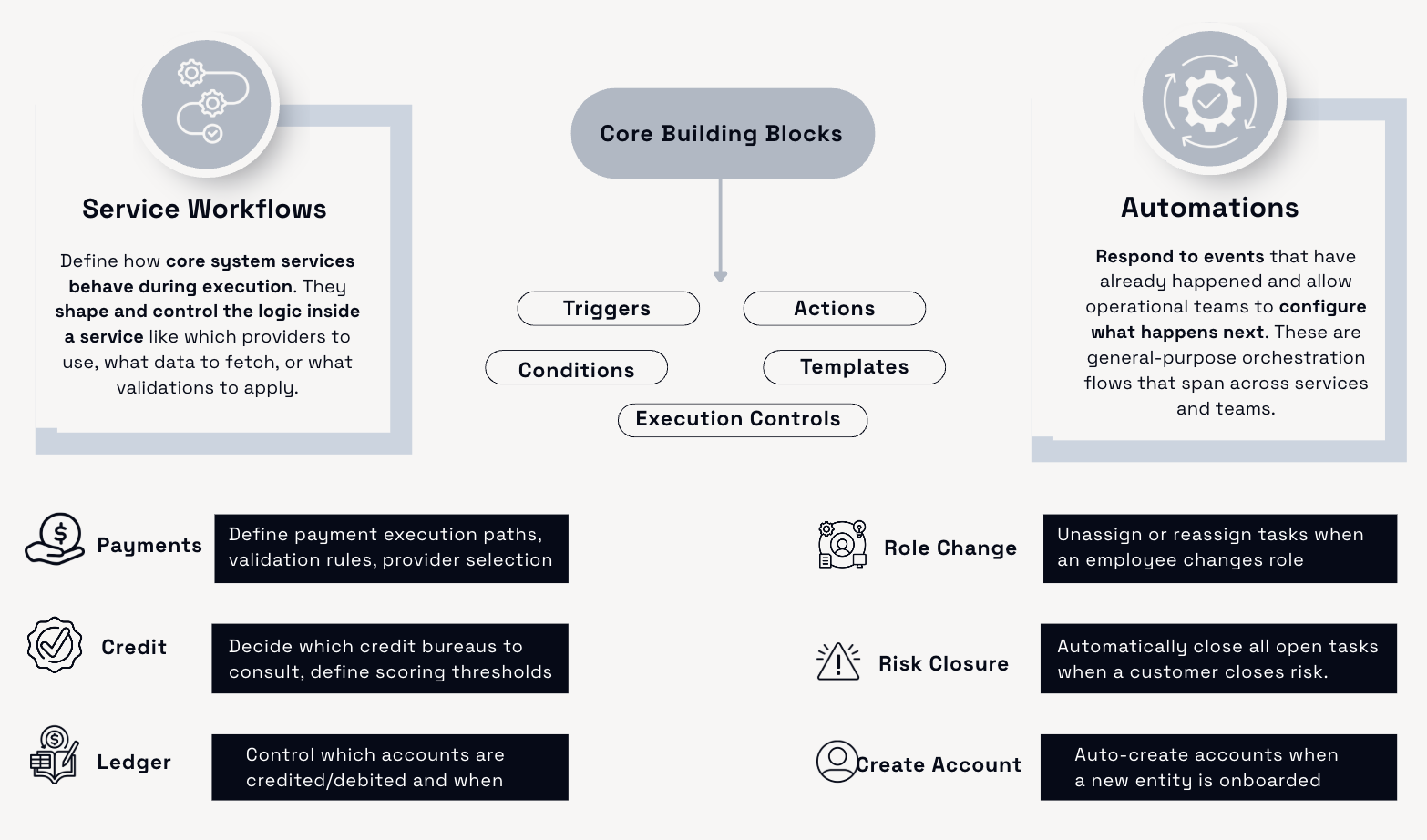
They are available across core services like Payments, Ledger, and Credit allowing you to individually design how service-specific operations execute. For example, you can define how a payment flow is routed, how a credit check is performed, or how the ledger should record balance updates.

In addition to these service-level flows, you can also create automation workflows that respond to system activity. These are useful for orchestrating cross-service reactions, such as sending an alert when a customer hits a credit threshold, triggering a task when a new entity is created, or updating account details after a role change.

All workflows are created using a visual builder in the Console, making it easy to design logic without writing code.


Service Workflows

Service workflows define how a system service behaves during execution. These workflows determine internal logic such as:

  • Which providers to call

  • What validation rules to apply

  • What data to fetch or ignore

Examples:

  • Payments: Define execution paths, provider selection, fraud checks

  • Credit: Decide which credit bureaus to consult, scoring logic

  • Ledger: Define rules for how and when accounts are credited or debited

2. Automation Workflows

Automation workflows respond to events that have already happened. These workflows allow operational teams to define what should happen next across services like task creation, notification, or account updates.

Examples:

  • Role Change: Reassign tasks when an employee leaves a team

  • Risk Closure: Automatically close tasks linked to blocked customers

  • Create Account: Generate an account when a new entity is onboarded


Key Features

Visual Canvas

Use the drag-and-drop canvas to build logic flows using triggers, conditions, and actions.

Triggers and Actions

  • Internal events (like EmployeeDeactivated, EntityCreated)

  • Custom HTTP triggers or webhooks (future support)

  • Task actions (create, assign, update)

  • Account or wallet creation

  • Notifications

Execution Controls

  • Conditional logic

  • Branching and parallel execution

  • End nodes and pause/resume behavior

Templates

Start faster using prebuilt workflow templates or create your own. Templates are reusable and save time on repetitive logic.

XYB Workflows are designed for:

  • Operations Leads who want to reduce manual work and improve reliability

  • Compliance Teams who need to enforce process-level rules

  • Case Managers who handle onboarding, KYC, or customer tasks

  • Business Analysts looking to prototype and validate improvements

Learn more about:

Building Blocks of a Workflow

Automation Tutorial

Payment Workflows


Last updated