Build a Customer Facing Fund Transfer Flow

Overview

This article shows how developers can build a payment flow where end users initiate a fund transfer, and the backend handles validation and moves funds from the sender to the beneficiary. By calling XYB’s Payments APIs, developers can retrieve sender and beneficiary information, load dynamic form fields, trigger built-in compliance and validation checks, and rely on the platform to process the payment and update downstream systems.

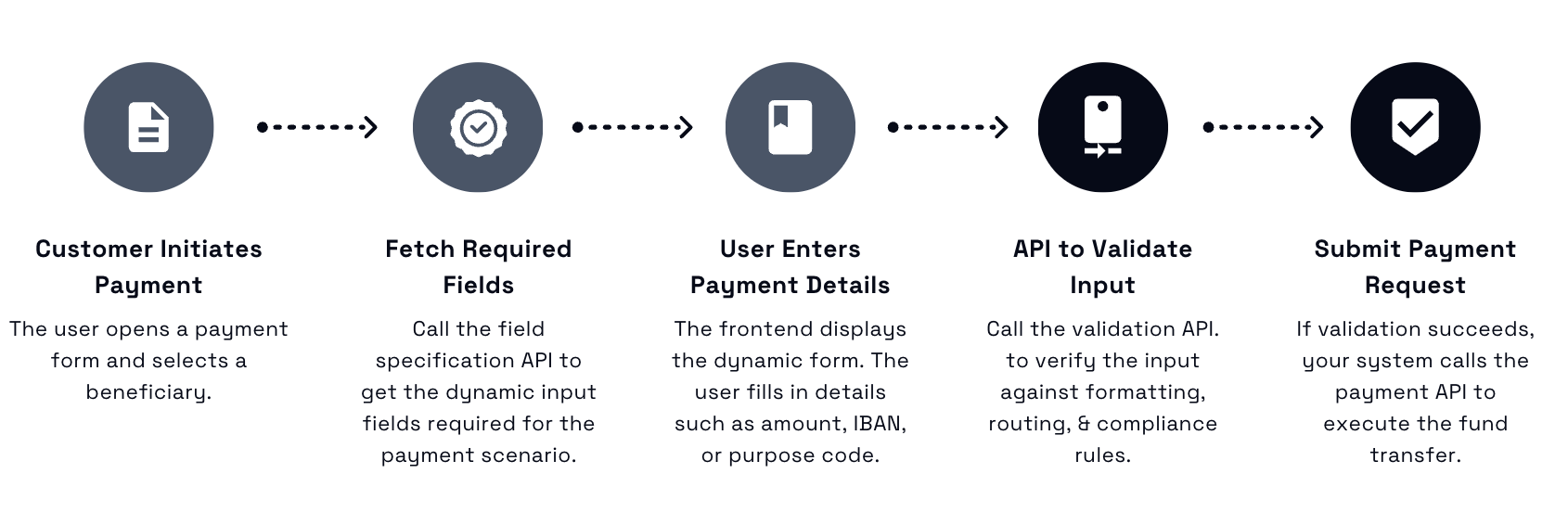
Here's an overview of a typical payment workflow:

Use case flexibility You can tailor this workflow for various payment methods, currencies, and compliance requirements by leveraging XYB’s dynamic field specification APIs.


Prerequisites

Before you begin, make sure:


Step-by-Step Workflow

  1. Render a UI in your frontend where the user can select the payer account (linked customer entity as mentioned above) and the beneficiary (already created).

  2. Call the following API to get the dynamic fields needed for this specific payment.

    GET /api/v1/fields/{identityReference}/payment?beneficiaryAccountIdOptional={uuid}
    • Path Parameter: identityReference (payer's entity)

    • Query Parameter: beneficiaryAccountIdOptional (optional but recommended)

    Result: You get a JSON response containing all required field groups, input formats, validation patterns, and visibility conditions for this payment.

Sample Response
{
  "fields": [
    {
      "name": "iban",
      "label": "IBAN",
      "type": "string",
      "required": true,
      "validationPattern": "^[A-Z]{2}\\d{2}[A-Z0-9]{1,30}$",
      "visible": true
    },
    {
      "name": "purpose_code",
      "label": "Purpose",
      "type": "dropdown",
      "required": false,
      "options": ["SALA", "PENS", "GOVT"],
      "visible": true
    },
    {
      "name": "tax_id",
      "label": "Tax ID",
      "type": "string",
      "required": false,
      "visible": false
    }
  ]
}

  1. Use the response to build a dynamic form for the user to fill. This form is customer-facing and should allow entry of details like IBAN, routing number, and payment purpose.

  • Show only the required fields for that scenario

  • Apply the field order and input validation (e.g. regex, required flags)

  • Implement visibility logic for conditional fields (e.g. show SWIFT fields only when needed)

  1. Call the validation API once the customer submits the form to validate all the information provided.

POST /api/v1/fields/{identityReference}/payment/validate

Sample Request body:

{
  "beneficiary_account_uuid": "...",
  "beneficiary_uuid": "...",
  "currency": "EUR",
  "fields": {
    "iban": "DE1234567890",
    "purpose_code": "SALA"
  }
}

Field Reference

Field
Type
Required
Description

beneficiary_account_uuid

string

Yes

UUID of the account receiving funds.

beneficiary_uuid

string

Yes

UUID of the recipient party.

currency

string

Yes

ISO 4217 currency code (e.g., EUR, USD).

fields.iban

string

Yes

International Bank Account Number of the recipient.

fields.purpose_code

string

Optional/Required (depends on currency & destination)

Purpose classification (e.g., SALA for salary).

Sample Success and Error Responses

Success Response

{
  "status": "valid",
  "validation_id": "val_abc123",
  "messages": []
}

Error Response

{
  "status": "invalid",
  "messages": [
    {
      "field": "iban",
      "error": "Invalid IBAN format for the selected country"
    },
    {
      "field": "purpose_code",
      "error": "Missing required field for EUR payments"
    }
  ]
}


  1. Call the main payment initiation API to initiate a payment request after all validations are complete.

    Endpoint:

    POST /api/payments/

Sample Request

{
  "id": "123e4567-e89b-12d3-a456-426614174000",
  "mandate": "user_001",
  "basis": {
    "from_account": "acc_123",
    "to_account": "acc_456"
  },
  "attributes": {
    "reference": "Invoice #4598",
    "notes": "Urgent payment"
  },
  "party_amount": {
    "value": 250.00,
    "currency": "USD"
  }
}

Request Body Parameters

Field
Type
Required
Description

id

string (UUID)

Yes

Unique identifier for the payment request

mandate

string

Yes

Reference to the user or entity initiating the payment

basis

object

Yes

Details of the party and beneficiary accounts

attributes

object

Yes

Dynamic key-value pairs from your frontend form

party_amount

object

Conditional

Amount to be debited from the initiating party

other_party_amount

object

Conditional

Amount to be credited to the beneficiary

Sample Success and Error Responses

Sample Success Response

{
  "payment_id": "pay_abc789",
  "status": "initiated",
  "timestamp": "2025-07-22T10:30:00Z"
}

Error Response Example

{
  "error": "invalid_mandate",
  "message": "Mandate user_001 does not exist or lacks permissions."
}

Outcome

Once the payment is successfully submitted:

  • XYB initiates the fund transfer

  • Transaction is routed via the configured adapter (e.g. SEPA, SWIFT, internal)

  • Ledger and account balances are updated

  • Transaction statuses are reflected in the Console and API responses

To understand the end-user experience, watch this video demonstration of a payment flow in XYB’s white-labeled mobile banking app.

Also check out:

Configure Third-Party Adapter

Last updated