> For the complete documentation index, see [llms.txt](https://docs.xyb.co/llms.txt). Markdown versions of documentation pages are available by appending `.md` to page URLs; this page is available as [Markdown](https://docs.xyb.co/the-platform/xyb-platform-overview/sso-setup-placeholder.md).
# SSO Setup
Single Sign-On (SSO) allows your team to access the XYB Console using your organization’s existing identity provider (IdP), such as Okta, Microsoft Entra ID (Azure AD), JumpCloud, Google Workspace, or any provider that supports SAML 2.0.\
This setup is fully self-service: XYB provides the details required to create a SAML app in your IdP, and you return your IdP’s metadata to complete the connection.
***
**Before you begin**
You will need:
* Access to your organisation’s IdP with permission to create or modify a SAML application.
* Admin access to the XYB Console
SSO configuration typically takes **5–10 minutes**.
***
1. Open your setup link: When your organisation begins onboarding with XYB, the designated admin receives an email inviting to set up SSO. Click **Continue setup** in the email and follow the prompts.
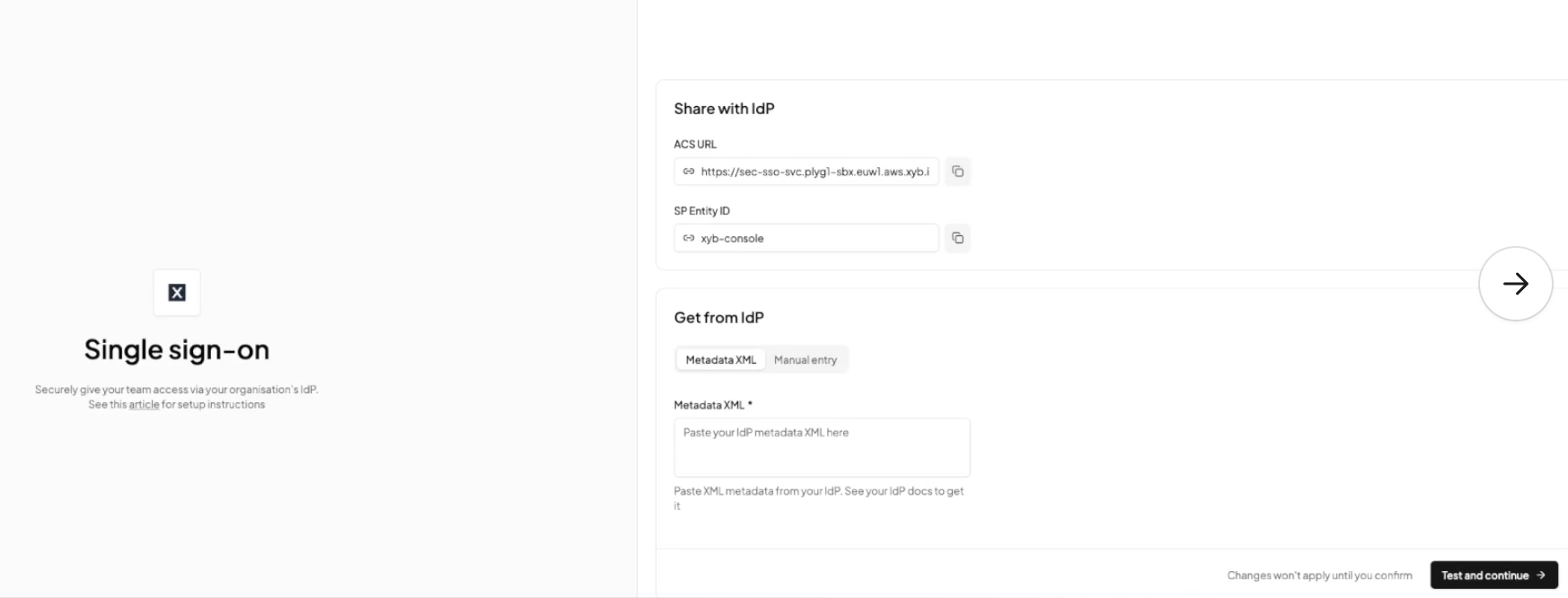
2. Configure your SSO connection**:** On the **Single sign-on** screen, you'll see two sections
* **Share with IdP**
These fields contain metadata from XYB.\
Add them to your Identity Provider when creating the new SAML app.
| Field | Description |
| ---------------- | --------------------------------------------------------------------------- |
| **ACS URL** | The Assertion Consumer Service URL used by your IdP to send SAML responses. |
| **SP Entity ID** | XYB’s Service Provider (SP) Identifier. |
{% hint style="info" %}
Use the **copy icon** next to each field to avoid typos.
{% endhint %}
***
* **Get metadata from your IdP:** Most identity providers have a “Download Metadata” option within the SAML app you create. Refer to their docs to obtain the metadata, and copy and paste it in Metadata XML field. XYB will fetch **IdP Entity ID, SAML Sign-In URL**, and **X.509 Certificate** from this. Alternatively, you can also click the **Manual entry** tab and provide these details in each field separately.
***
**3. Test your SSO connection**
Once you’ve entered all three IdP values, click **Test and continue.** XYB securely validates that it can reach your IdP and process authentication requests. You will receive one of the following results:
* **Success: Connection test successful.** You will see a confirmation message stating that your SSO connection is working. Click **Enable SSO** to activate SSO for your organisation.
* **Failed: Connection test failed.** If XYB cannot reach your IdP or the metadata is invalid, you’ll see: **“Connection test failed. IdP cannot be reached.”** Click **Go back** to review the fields and test again, or reach out to our support team.
You will then be redirected to your IdP to sign in for the first time. Upon completing the SSO flow, you'll be redirected back to the XYB console. Your organisation’s SSO setup is now complete and becomes the login method for all users in your organisation
***
***
---
# Agent Instructions
This documentation is published with GitBook. GitBook is the documentation platform designed so that both humans and AI agents can read, navigate, and reason over technical content effectively. Learn more at gitbook.com.
## Querying This Documentation
If you need additional information that is not directly available in this page, you can query the documentation dynamically by asking a question.
Perform an HTTP GET request on the current page URL with the `ask` query parameter, and the optional `goal` query parameter:
```
GET https://docs.xyb.co/the-platform/xyb-platform-overview/sso-setup-placeholder.md?ask=&goal=
```
`ask` is the immediate question: it should be specific, self-contained, and written in natural language.
`goal` is optional and describes the broader end goal you are ultimately trying to accomplish on behalf of the user. GitBook uses it to tailor the answer towards what is most useful for that goal.
The response will contain a direct answer to the question and relevant excerpts and sources from the documentation.
Use this mechanism when the answer is not explicitly present in the current page, you need clarification or additional context, or you want to retrieve related documentation sections.